
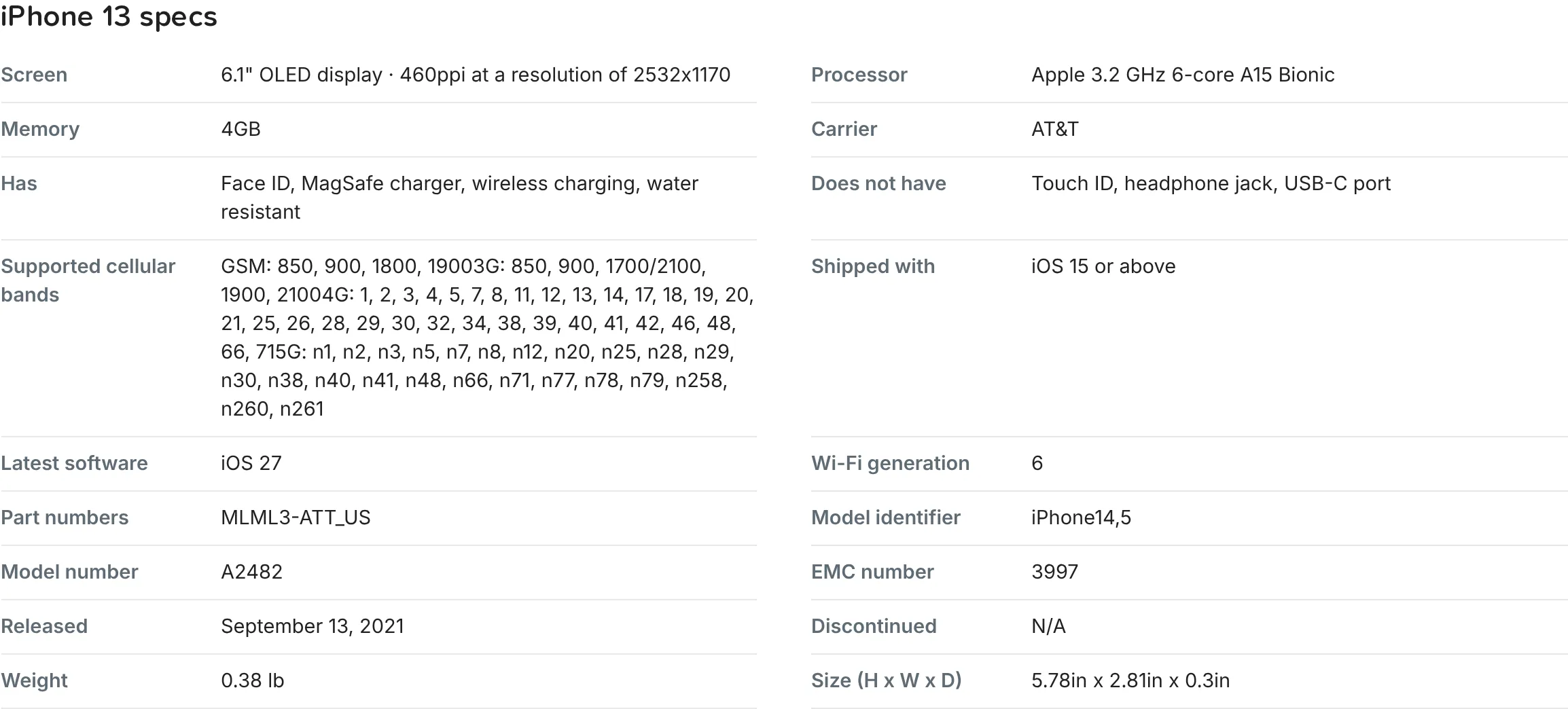
Every product page on RefurbMe has a full spec sheet. Open the product and scroll down to the specs section, just below the photos of what each grade looks like. You get the screen, the processor, the memory, what the device has and lacks (Face ID, MagSafe, headphone jack), the supported cellular bands, the software it shipped with and the latest it runs, the model numbers, the release date, the weight and the size. Some families add rows, such as graphics and battery life on a Mac. It is the same spec data whichever seller you end up buying from.
How do I open the spec sheet?
- Open the product page for the model you want.
- Scroll down past the photos of what each grade looks like, to the section titled with the model name and "specs", for example "iPhone 13 specs".
- Read the table. Each row is one spec, from Screen and Processor down to Weight and Size.
Can I search by spec instead?
Yes. On a model's list, click Filters above the cards to narrow by storage, color, SIM, battery and features like 5G. On a Mac the panel also offers memory, processor and screen size. You can also narrow by seller, such as Apple Store only, or by carrier to find unlocked iPhones.
Compare specs and prices together
Check the full spec sheet, then see every seller's price for that exact model.
Browse refurbished MacBooks