Short answer: find your model in the tables below. If you are buying a new Apple device anyway, trade-in is the fast option. If you want cash, or your next phone will not come from Apple, a buyback program pays into a bank account instead, and for some older iPhones it quotes far more than Apple does. Keep the new-device math in view too: a new iPhone 17 now starts at $899, and the $430 Apple pays for an iPhone 16 covers about 48 percent of it.
Refurbished is the side of this decision that a trade-in calculator never shows you. According to RefurbMe's own tracking, a new iPhone generation takes a median of 67 days to reach the refurbished market after Apple announces it (Time-to-Refurb, as of October 2026, source: /stats/iphone). On RefurbMe's live listings, a refurbished iPhone 17 with 256GB starts at $700 at eBay Refurbished, against $899 new.
This guide covers what Apple is paying right now for iPhone, iPad, Mac and Apple Watch, what changed across the four 2026 updates, how the credit-versus-cash math actually works, and how to keep your quoted value from dropping once Apple inspects the device.
What Apple Trade In actually pays you
Apple Trade In is a device exchange program, not a marketplace. You answer a few condition questions, Apple gives you an estimated value, and that value goes toward a new Apple purchase, whether that is an iPhone, iPad, Mac or anything else Apple sells. If you are not buying anything at the time, Apple issues an Apple Gift Card by email instead, which you can use later.
How the credit lands depends on how you pay. Apple's trade-in FAQ says that if you buy an iPhone, iPad, Mac or Apple Watch and pay in full, the credit goes back to your original payment method, up to the total purchase price, once Apple receives the old device and confirms its condition. If the trade-in is worth more than the new device, Apple emails you an Apple Gift Card for the rest. On a monthly payment plan, the estimate comes straight off the purchase price.
Two things about that number matter before you rely on it. First, it is an estimate based on what you report online, not a locked offer. Apple confirms the final amount only after receiving and inspecting the device. Second, the credit stays inside Apple. You cannot take a Trade In estimate and cash it out, and you cannot spend it at a third-party refurbisher. If you want money you can use anywhere, including on a refurbished device from a different seller, trading in through Apple is not the path: see our FAQ on trading in when buying refurbished for how that interacts with a refurbished purchase specifically.
One change from September helps people with lightly marked devices. MacRumors reported on 9 September 2026 that Apple was moving to more granular condition pricing, so that a small chip in the display glass no longer costs as much as a cracked screen, and that no device would get less under the new system.
Current Apple Trade In values (October 2026)
These are the maximum estimated values Apple shows in the U.S. on its Trade In page, checked on 7 October 2026. They assume a device in good condition. A device with a cracked screen, a swollen battery or a failed diagnostic test will quote lower, sometimes far lower, than the numbers below.
iPhone trade-in values
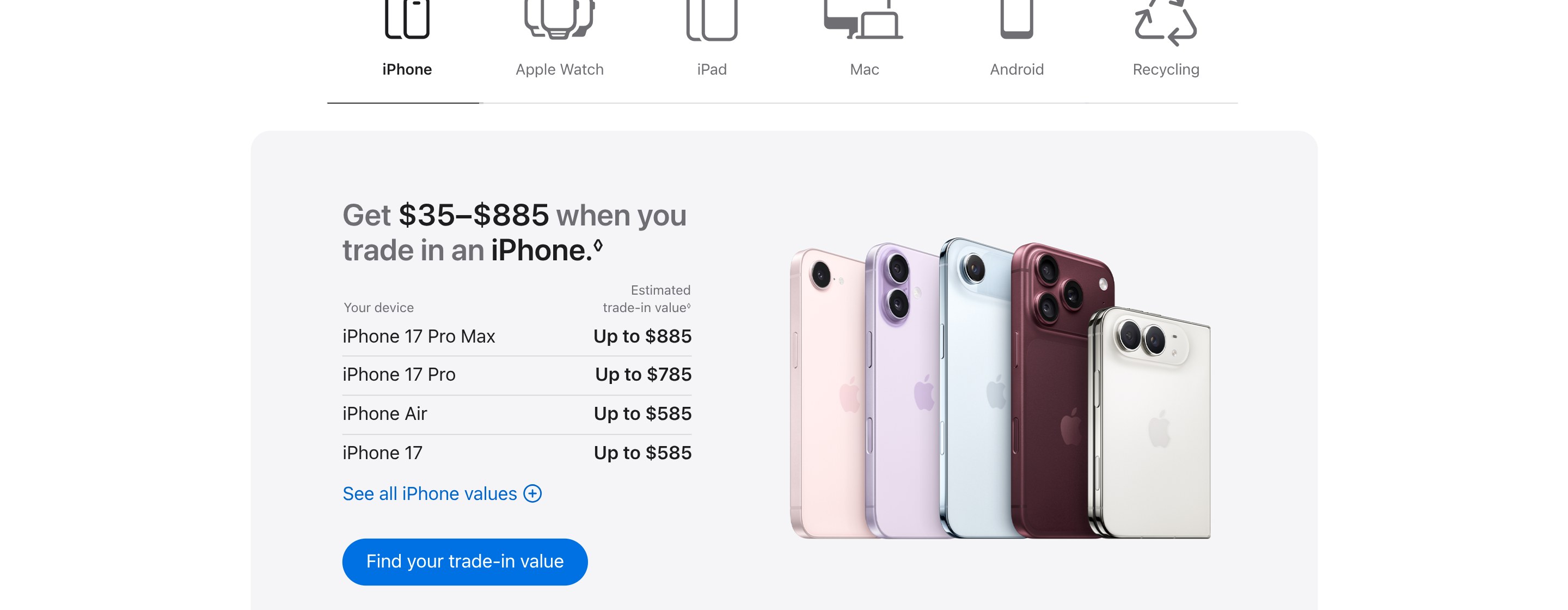
Apple's iPhone list now starts with the iPhone 17 family, which joined it after the iPhone 18 Pro and iPhone Duo were announced. The newest models are not on it yet.
| Model |
Max trade-in value |
| iPhone 17 Pro Max |
$885 |
| iPhone 17 Pro |
$785 |
| iPhone Air |
$585 |
| iPhone 17 |
$585 |
| iPhone 16 Pro Max |
$610 |
| iPhone 16 Pro |
$510 |
| iPhone 16 Plus |
$430 |
| iPhone 16 |
$430 |
| iPhone 16e |
$270 |
| iPhone 15 Pro Max |
$455 |
| iPhone 15 Pro |
$370 |
| iPhone 15 Plus |
$315 |
| iPhone 15 |
$305 |
| iPhone 14 Pro Max |
$360 |
| iPhone 14 Pro |
$285 |
| iPhone 14 Plus |
$210 |
| iPhone 14 |
$195 |
| iPhone 13 Pro Max |
$320 |
| iPhone 13 Pro |
$255 |
| iPhone 13 |
$175 |
| iPhone 13 mini |
$145 |
iPad trade-in values
| Model |
Max trade-in value |
| iPad Pro |
$905 |
| iPad Air |
$510 |
| iPad mini |
$320 |
| iPad (base) |
$280 |
Mac trade-in values
| Model |
Max trade-in value |
| MacBook Pro |
$1,315 |
| MacBook Air |
$705 |
| Mac Studio |
$1,460 |
| Mac Pro |
$2,195 |
| Mac mini |
$620 |
| iMac |
$385 |
| iMac Pro |
$340 |
Apple Watch trade-in values
| Model |
Max trade-in value |
| Apple Watch Ultra 3 |
$430 |
| Apple Watch Ultra 2 |
$265 |
| Apple Watch Series 11 |
$200 |
| Apple Watch Series 10 |
$150 |
| Apple Watch SE (3rd generation) |
$115 |
Older devices still show a value, usually a small one. An iPhone 12 tops out at $120 and an iPhone 11 at $100, and Apple's page lists dozens of legacy configurations we have not reproduced here. Check your exact model on Apple's Trade In page for a number specific to your storage size and carrier.
These are U.S. figures. Apple's other English-language stores price trade-ins in their own currency and do not move in step with the U.S. list. On 7 October 2026, Apple's UK page showed up to £855 for an iPhone 17 Pro Max, £895 for a MacBook Pro and £830 for an iPad Pro. Apple's Canadian page showed up to C$1,415 for an iPhone 17 Pro Max, C$1,630 for a MacBook Pro and C$1,330 for an iPad Pro.
What changed in 2026: three increases, then a September cut
Apple changed its U.S. trade-in estimates four times in 2026: 2 March, 27 May, 6 August, and a mid-September update that MacRumors reported on 15 September. The first three mostly raised values. The fourth split the lineup in two.
| Model |
Before 2026 |
2 March |
27 May |
6 August |
Mid-September |
| iPhone 16 Pro Max |
$670 |
$685 |
$695 |
$720 |
$610 |
| iPad Pro |
$685 |
$670 |
$690 |
$720 |
$905 |
| MacBook Air |
$470 |
$485 |
$520 |
$580 |
$705 |
| MacBook Pro |
$710 |
$685 |
$690 |
$855 |
$1,315 |
Through August, the iPhone line moved in small, steady steps. iPad was mixed: iPad Pro dropped $15 in March before recovering in May and August, while iPad Air and the base iPad rose in both March and May. Mac barely moved in March, MacBook Pro down $25 and MacBook Air up $15, and then climbed through May and August.
September reversed the iPhone trend. Every iPhone already on Apple's list lost value. The iPhone 16 Pro took the steepest cut, from $630 to $510. That is about 19 percent, and at $120 it is also the biggest drop in dollars, $10 more than the iPhone 16 Pro Max lost. iPad and Mac went the other way. iPad Pro rose from $720 to $905, MacBook Pro from $855 to $1,315, and Mac mini from $480 to $620. Since the May update, a MacBook Pro's maximum estimate has nearly doubled, from $690 to $1,315.
The practical takeaway depends on what you own. If you checked an iPhone's value over the summer, check again before you count on it: an iPhone 16 that quoted $480 in August quotes $430 today. If you own a Mac or an iPad you were thinking of replacing, this is the best Apple has paid all year. Apple now pays up to $620 for a Mac mini, and a refurbished Mac mini M4 with 16GB of memory costs $729 at eBay Refurbished (7 October 2026).
How the trade-in process actually works
Online and in-store trade-ins follow slightly different paths, but both end with your old device gone and credit applied.
Online, through the Apple Store app or website:
- Start a new purchase and select "trade in" for the device you are buying against.
- Choose your old device's exact model and answer a short set of condition questions about the screen, whether it powers on, and any damage or prior repairs.
- Apple shows an estimated value immediately. Accept it and the credit is tied to your order.
- Ship the old device back within 14 days of receiving your new one. Apple's FAQ says the estimate is valid for 14 days after you receive your new device, and the whole online process generally takes 2 to 3 weeks.
- Apple inspects the device on arrival. If it matches what you reported, the trade-in is final and the credit can take 3 to 5 business days to process. If it does not match, Apple says your original payment method will be charged the difference in value, and it will check with you that you still want to go ahead.
In-store, at any Apple Store:
A specialist inspects the device on the spot rather than relying on your self-reported condition, so the in-store number is often more accurate on the first pass. Apple notes that the in-store credit may differ from the online estimate if the condition does not match what you described. You leave with credit applied to your purchase, or loaded onto a gift card if you are not buying that day.
Apple Trade In vs selling to a buyback marketplace
If your priority is money rather than a new Apple purchase, Apple Trade In is competing with a buyback marketplace. The two pay in different ways.
Apple Trade In pays in credit toward an Apple purchase, or an Apple Gift Card if you are not buying anything right now. It is fast and requires no negotiation, but the payout stays inside Apple's ecosystem.
A third-party buyback program pays cash. Back Market's trade-in service says you get an offer from a refurbisher in about 2 minutes, ship the device for free, and receive payment in 5 days. Its U.S. iPhone sell page, with a price update dated 7 October 2026, lists these maximum offers next to Apple's:
| Model |
Back Market buyback, up to |
Apple Trade In, up to |
| iPhone 15 Pro Max |
$465 |
$455 |
| iPhone 15 |
$526 |
$305 |
| iPhone 14 |
$206 |
$195 |
| iPhone 13 Pro |
$465 |
$255 |
Read those buyback numbers as ceilings, not quotes. They come from refurbishers bidding for the best storage size and condition, and they do not line up the way Apple's do: the same page lists the iPhone 15 above the iPhone 15 Pro Max. Run the assessment for your own model before you decide. Even so, the gap on some older models is large enough to matter, and the money arrives as cash you can spend anywhere, including on a refurbished replacement.
The difference that matters most: cash from a buyback sale is not tied to any specific next purchase. Apple credit is. If you plan to buy your next device refurbished rather than new, Apple Trade In's credit does little for you, since it can only be spent at Apple. For a full breakdown of trade-in credit against buying refurbished as your next device, see our guide on Apple Trade In vs buying refurbished.
When trade-in wins and when selling wins
Neither option is always better. It depends on what you want out of the old device.
Trade-in wins when:
- You are already buying a new Apple device and want the credit applied to that order.
- You own a recent iPad or Mac. After the September update, Apple's estimates for those are the highest they have been all year.
- You want Apple to handle data wiping, shipping and recycling end to end, with no separate sale to manage.
Selling wins when:
- You want cash, not Apple-only credit, especially if your next purchase will not be from Apple at all.
- You own an iPhone a few generations old, where a buyback offer is more likely to beat Apple's now that Apple has cut its iPhone values.
- You plan to buy refurbished next, since cash from a sale can go toward any seller, while trade-in credit cannot.
The two are not mutually exclusive. You can sell or trade in the old device for whatever it is worth, then separately decide whether the next device is new, from Apple, or refurbished, from somewhere else entirely. And if the number on either side is not worth the hassle, keeping the device is a legitimate third option: our guide to repurposing an old iPad covers what an unwanted device is still good for.
The other half of the math: what a refurbished replacement actually costs
Every trade-in calculator answers one side of the question: what your old device is worth. None of them answer the other side: what your next device costs if you do not buy new.
RefurbMe tracks that gap directly. A new iPhone generation reaches the refurbished market a median of 67 days after Apple announces it, based on RefurbMe's Time-to-Refurb tracking as of October 2026 (source: /stats/iphone). Within three months of launch, a model usually has a working refurbished market with several sellers competing on price. That is why the iPhone 17 already has refurbished listings, and why the iPhone 18 Pro and iPhone Duo will take a while to follow.
Here is what that means in dollars, using RefurbMe's live listings on 7 October 2026. Say you own an iPhone 14.
- Trade in and buy new. Apple pays up to $195 for it. Put that toward a new iPhone 17 at $899 and you still pay $704.
- Sell and buy refurbished. Back Market's sell page lists up to $206 for the same phone. A refurbished iPhone 16 starts at $409 at eBay Refurbished, a 128GB AT&T model, so the cash covers about half of it and you pay around $203. The cheapest unlocked iPhone 16 is $452 at eBay Refurbished, and Back Market's lowest is $449, also an AT&T model.
- Sell and buy a refurbished iPhone 17. A 256GB unlocked unit starts at $700 at eBay Refurbished, with Gazelle at $712 for an unlocked one and Back Market at $739 for a Verizon model. Apple's $899 base iPhone 17 has the same 256GB, so the refurbished route saves about $200 before you even count the old phone.
We did not compare cosmetic grades across those listings, so check the grade and warranty on each one before you buy. Refurbished pricing moves with supply, so treat these as a 7 October snapshot and compare against RefurbMe's live iPhone listings or MacBook listings before deciding. The point stands either way: trade-in credit and buyback cash both cover only part of a new device's price, while the same money goes much further on a refurbished one. Apple sells its own certified refurbished stock too; our breakdown of whether Apple's refurbished store is the best deal and 10 facts on whether Apple refurbished is worth it cover that trade-off in full.